Social media has become a visual-first marketing environment. Businesses are expected to publish videos, product creatives, ads, educational content, promotional posts, and short-form content consistently across multiple platforms. For many teams, the biggest challenge is not coming up with ideas—it is producing enough high-quality content to keep up.
That is where an AI video generator for social media can make a significant difference.
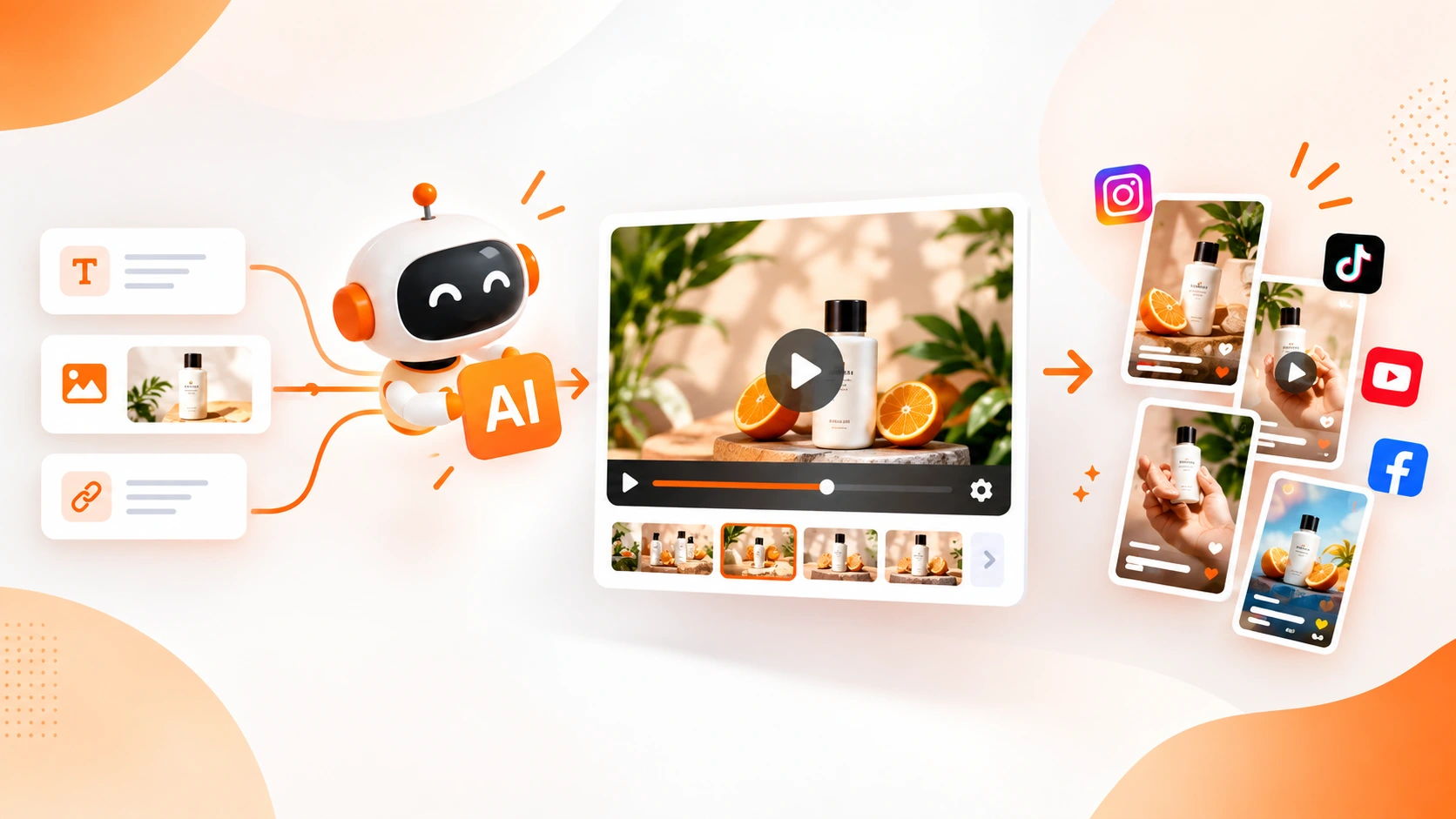
Instead of starting every video from a blank timeline, businesses can use artificial intelligence to turn ideas, text prompts, images, and existing creative assets into engaging visual content. With the right workflow, AI can help businesses move from an idea to a finished social media video much faster while still leaving room for creative control.
Blazo AI brings AI-powered image and video creation into one marketing platform, allowing businesses to create visual content from text and images for social media, advertising, and other marketing campaigns.
What Is an AI Video Generator for Social Media?
An AI video generator for social media is a software tool that uses artificial intelligence to help create videos from written instructions, images, concepts, or other digital assets.
Traditional video production often requires multiple steps: developing a concept, writing a script, finding visuals, recording or sourcing footage, editing scenes, adding text, choosing music, and exporting different versions.
AI video generation can simplify many of those steps.
For example, a business could start with a simple idea such as:
“Create a short promotional video for a new summer product, highlighting its main benefit and ending with a call to action.”
An AI-powered creative workflow can turn that concept into a starting point for a social media video. Businesses can also begin with an existing product image and use AI to transform that static asset into a more dynamic piece of content.
The goal is not to eliminate human creativity. Instead, AI gives marketing teams a faster way to turn creative ideas into usable assets.
Why Businesses Are Using AI to Create Social Media Videos
Creating one social media video occasionally is manageable. Creating fresh videos every week—or every day—for several platforms is a different challenge.
Businesses may need creative for:
- Instagram Reels
- Facebook video posts and ads
- TikTok videos
- YouTube Shorts
- Paid social advertising
- Product promotions
- Educational content
- Seasonal campaigns
- Brand awareness campaigns
- Retargeting campaigns
AI can help reduce the amount of manual work required to produce these variations.
1. Create More Content in Less Time
One of the biggest advantages of AI video generation is speed. Instead of spending hours building every video from scratch, marketers can generate a starting point from a prompt or existing creative asset and then refine it.
This makes it easier to maintain a consistent publishing schedule without dramatically increasing production time.
2. Turn Static Images Into Video Concepts
A product photograph does not have to remain a static image.
AI can help businesses use existing images as the starting point for new video concepts. This can be particularly useful for ecommerce businesses, restaurants, real estate companies, service providers, and brands that already have a library of product or promotional images.
3. Produce Multiple Creative Variations
Social media advertising is rarely about finding one perfect creative and using it forever. Marketing teams often need multiple hooks, messages, visuals, offers, and formats to discover what resonates with their audience.
AI makes it easier to experiment with different creative directions without rebuilding every asset manually.
4. Reduce Creative Production Bottlenecks
A marketing campaign can be ready to launch while the creative is still being produced.
When content creation becomes a bottleneck, campaigns can miss opportunities, promotions can become outdated, and teams may end up reusing the same creative for too long.
AI-powered creation gives marketers another way to increase their creative output without depending entirely on traditional production workflows.
How to Create a Social Media Video With AI
The process can be surprisingly simple when you approach AI video creation as a marketing workflow rather than just a video-generation experiment.
Step 1: Start With a Clear Objective
Before generating anything, determine what the video needs to accomplish.
For example:
- Generate product awareness
- Promote a sale
- Drive website traffic
- Generate leads
- Explain a service
- Introduce a new product
- Educate an audience
- Retarget previous visitors
A clear objective gives the AI a much better creative direction.
Step 2: Decide What You Want to Start With
With an AI creative platform such as Blazo AI, businesses can approach content creation from different starting points.
You might begin with:
- A text description
- A product image
- A promotional concept
- An existing creative asset
- A campaign idea
Starting with text is useful when you have an idea but no visual asset. Starting with an image can be useful when your business already has product photography, campaign graphics, or other visual material.
Step 3: Give the AI Specific Instructions
The quality of your instructions can have a major impact on the direction of the generated content.
Instead of writing:
“Create a video for my product.”
Try providing more useful context:
“Create a short social media promotional video for a premium skincare product. Use a clean, modern visual style, focus on the product benefits, keep the message easy to understand, and finish with a strong call to action.”
Your prompt can describe the audience, product, tone, visual style, message, offer, and desired action.
Step 4: Review and Refine the Creative
AI-generated content should be treated as a creative starting point—not something that must always be published exactly as generated.
Review the video for:
- Brand consistency
- Message clarity
- Visual quality
- Text readability
- Product accuracy
- Pacing
- Call-to-action clarity
- Overall relevance to the target audience
Make changes wherever necessary before publishing.
Step 5: Create Platform-Specific Versions
A common mistake is creating one video and posting the exact same version everywhere.
Different platforms have different user behaviors, creative environments, and content formats. A vertical video designed for TikTok or Instagram Reels may need a different opening, pacing, text placement, or message than a video created for another channel.
TikTok's own creative guidance recommends thinking about the platform first, using vertical video, considering safe areas, and structuring creative around a hook, message, and close. TikTok's Creative Codes provides additional guidance for businesses creating ads.
AI Video Ideas for Social Media
An AI video generator can be used for much more than simple promotional advertisements.
Product Videos
Turn product images and descriptions into short promotional videos that demonstrate features, benefits, use cases, or offers.
Social Media Ads
Create different creative concepts for paid campaigns. Test different hooks, visuals, offers, and calls to action instead of relying on a single advertisement.
Educational Videos
Turn frequently asked questions, tips, tutorials, and industry knowledge into short educational videos.
Before-and-After Content
Businesses in industries such as home improvement, beauty, fitness, automotive, and professional services can use visual storytelling to demonstrate transformations.
Promotional Announcements
AI video can help turn seasonal promotions, limited-time offers, new product announcements, and special events into attention-grabbing social content.
UGC-Inspired Creative
Businesses can experiment with authentic, conversational creative concepts instead of making every video look like a traditional polished commercial.
Real Estate Marketing
Real estate businesses can turn property images and marketing messages into short videos designed for social feeds and advertising campaigns.
AI Video Generator vs. Traditional Video Production
| Traditional Production | AI-Assisted Creation |
|---|---|
| Often requires multiple production steps | Can begin from a simple prompt or image |
| More manual editing | AI can accelerate creative development |
| Producing many variations can take significant time | Multiple creative concepts can be developed faster |
| Large production projects may require specialized resources | Marketing teams can create more content internally |
| Changes may require additional editing work | AI provides a faster starting point for revisions and variations |
This does not mean traditional production has become obsolete. High-budget campaigns, professional commercials, complex product shoots, and certain brand projects still benefit from professional production.
The advantage of AI is that it gives businesses another production option—especially for the large volume of everyday marketing content required by social media.
Best Practices for AI-Generated Social Media Videos
Start With the Hook
Social media users scroll quickly. Your opening needs to give viewers a reason to continue watching.
Consider starting with:
- A question
- A surprising fact
- A customer problem
- A strong product benefit
- A visually interesting moment
- A direct statement
TikTok recommends a structure built around a strong hook, communicating the value of the product or message, and ending with a clear call to action. TikTok's short-video guidance explains this approach in more detail.
Keep the Message Simple
Do not try to explain everything in one short video.
Choose one primary message and build the creative around it. If you have five benefits to communicate, consider creating five different videos instead of forcing all five into one.
Use Branding Throughout the Video
Your audience should understand who the content is from without having to wait until the final frame.
Use consistent visual elements, product presentation, messaging, and brand cues where appropriate.
Design for Vertical Viewing
For short-form platforms, vertical video is often the natural starting point. Make sure important text, products, faces, and calls to action are positioned where platform interfaces will not cover them.
TikTok specifically recommends full-screen vertical creative and attention to platform safe areas. TikTok's video creative guidance explains why the full-screen format matters.
Make the CTA Clear
Do not make the viewer guess what to do next.
Depending on your campaign, the CTA could be:
- Shop Now
- Learn More
- Get a Quote
- Book a Demo
- Visit Our Website
- Try It Today
- Sign Up
Create Multiple Versions
One of the biggest advantages of AI is the ability to experiment.
Instead of asking, “Which video is the best?” create several creative directions and allow real campaign performance to help answer the question.
Common Mistakes to Avoid With AI Video Generation
1. Making the Video Too Generic
AI can generate attractive visuals, but attractive does not automatically mean effective.
Your content should still communicate something meaningful about your business, product, audience, or offer.
2. Using Too Much Text
A video overloaded with text can be difficult to watch, particularly on a mobile screen.
Keep on-screen messaging concise and use the video itself to communicate the story.
3. Ignoring the Platform
Do not assume that one creative format will perform identically across TikTok, Instagram, Facebook, and YouTube.
Even YouTube's current Shorts guidance emphasizes that recommendations are influenced by viewer interests and performance rather than one universal preferred format. YouTube's Shorts search and discovery guidance is a useful reference for understanding how Shorts are surfaced.
4. Publishing Without Reviewing
Always review AI-generated content before publishing. Check product details, spelling, branding, visual accuracy, claims, and the overall message.
5. Reusing the Same Creative Forever
Even a successful video can eventually become less effective when audiences see it repeatedly.
Use AI to continuously develop new concepts, hooks, visual approaches, and variations rather than allowing one creative asset to carry an entire campaign indefinitely.
Why Blazo AI for Social Media Video Creation?
Blazo AI is designed to help businesses create marketing content with artificial intelligence instead of relying on separate tools for every creative task.
Businesses can use AI to create images and videos from text and existing images, giving marketing teams a flexible way to develop new creative concepts for social media and advertising.
That means a campaign can start with an idea and develop into multiple visual assets without requiring the team to begin every piece of content from scratch.
For example, a business could start with a product description, generate an image concept, turn a product image into a video concept, and then develop additional social media creatives around the same campaign.
The bigger advantage is the workflow: instead of thinking about AI video as a standalone novelty, businesses can use AI as part of their broader content production process.
How to Build an AI Social Media Content Workflow
A practical workflow could look like this:
- Choose the campaign objective.
- Identify the audience.
- Write the core message.
- Create an initial visual concept with AI.
- Generate multiple video variations.
- Adapt creative for each social platform.
- Review branding and accuracy.
- Publish and measure performance.
- Use performance insights to develop the next creative.
This creates a continuous creative cycle rather than a one-time video production process.
AI Video Creation Is About More Than Automation
The biggest opportunity with AI video generation is not simply making videos faster.
It is making experimentation easier.
When producing a video takes significant time and resources, teams naturally become cautious about creating too many variations. AI changes that equation by making it easier to explore different ideas.
You can test a product-focused video against a problem-solution concept. You can try a professional brand style against a more casual social-first style. You can test different hooks, offers, visuals, and calls to action.
That gives marketers more creative opportunities to learn what their audience responds to.
Final Thoughts
An AI video generator for social media can help businesses overcome one of the biggest challenges in modern digital marketing: producing enough quality creative to keep up with demand.
From product promotions and social media ads to educational videos and short-form content, AI can accelerate the journey from an idea to a finished creative asset.
The most effective approach is not to let AI replace your marketing strategy. Instead, use AI to make your strategy easier to execute.
With Blazo AI, businesses can use AI-powered tools to create images and videos from text and images, giving marketing teams a faster way to turn ideas into social media-ready creative.
Ready to create your next social media video with AI? Explore Blazo AI and turn your next marketing idea into visual content faster.